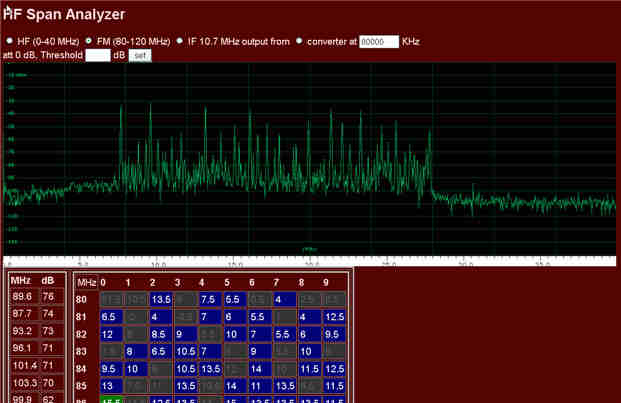
I've been experimenting with Perseus screen captures via PHP. The first tool is for offset spectrum analysis. It will load the Perseus main spectrum into the browser, shift it according to the calibration and give you a list of all peaks with the exact frequencies and dB values. It is also possible to calibrate remote receivers and analyze their spectrum.
The second main tool can read the HF spectrum data from RFSpan.
create the subdirectory 'c:\xampp\htdocs\perseus' and unpack the PerseusPHPKit.zip there (other paths are also possible)
optional: com0com for virtual COM port access. If you use other ports than COM11 you must configure the civ function in pcontrol.php (part of the Kit). For offset detection, the software will alternatively try to read the frequency from the display with a mini OCR algorithm (see below). If you are on a 64 Bit operating system com0com needs signed drivers. In this case, install this com0com 64 bit version instead!
If you save a userlist1.csv from FMSCAN.org in the PHP Kit directory it will show up frequency information with some additional columns:
distance, azimuth, maximum level, offsets, language, times and days.
start your Perseus software
type http://localhost/perseus into your browser
Previous versions could only read XP fonts (reading out frequency from Perseus graphic). Since Nov-2014 it also works on Windows 7 (at least on my personal setup), in 2020 an improved recognition for Windows 10 has been added. It's still possible that problems occur with other systems/fonts or with other Perseus versions than 4.0, 4.1 and 5.0
The kit should at least be comatible with all versions from PHP4 to PHP7.
Calibration with the tool will be much more precise because now you can
set the calibration as exact as 0,03 Hz while the Perseus software only allows 1 Hz steps. Put off the internal calibration by the Perseus software (press CalClr). For the best results go to a reference signal (like 5000 KHz),
choose the most exact span, leave calibration fields empty and check the deviation. After that put in the values. Now you can start analyzing.
The scripts:
Just start with the index file or access these files directly:
readspec6.php
can be accessed directly for the live mode. It can also analyze spectrum image files captured with perseusgrab.php. The write mode is not supported (only works with my local database).
perseusgrab.php
captures ans saves the spectrum and changes the frequency according to a few parameters in the script. It regularly will capture a reference frequency (after 20 pics).
Lateron, redspec.php will automatically check for the spectrum pics and calibrate the images accordingly.
hfspan-spec.php
analyzes a 40 MHz HF span spectrum (10 and 20 MHz not supported yet). The attenuation will be detected automatically.
You can access various converter options. Values are in dBµV which I prefer for FM.
Please feel invited to use and adapt the PHP code to your needs. Here is what you might find helpful:
Frequency capture
In the current settings frequency will be read by font recognition. It just grabs a few distinctive pixels, some kind of OCR light. This will also work for the FM+ software which has no COM port support.
CI-V access with PHP
Unfortunately serial port access in PHP is limited and tricky. For write purposes, PHP allows access by fwrite using the ports COM1 to COM9. You can set frequency or omdes with that. pcontrol.php is preconfigured for COM7. So you can run the Perseus on COM10 and build a pair COM7-COM10 with com0com.
Reading data still requires a workaround. That's why I've written and compiled a univeral tool for serial port access that can be called by PHP via the shell extension. At least it's an approach. In case that it works, you can control the Perseus via any browser (remote or localhost with Apache running in the background).
Until now, you can retrieve and set the frequency, the mode and read the S-Meter. The C++ executable is called comxs, the according Perseus fuctions can be found in pcontrol.php. Both are part of the download.
Here is a documentation that explains the commands for virtual serial port more comprehenseive than the provided pdf.
Automatic HWND detection
The whole spectrum analysis is based on the PHP imagegrabwindow function which requires the HWND Window handle (which is just a number identifying the window). Another C++ tool will detect this HWND automatically for your current Perseus window.
More info here.
New: Now you can even read the frequency from the Perseus image with the readfreqbyim function in pcontrol.php.